Voice Calculator
Voice Calculator allows you to perform mathematical calculations using your voice, available both as a Chrome extension and as a standalone Windows application.
Choose Your Version
🌐 Chrome Extension
Use Voice Calculator directly in your Chrome browser. Perfect for quick access while browsing the web.
- Integrated popup interface
- Multi-language support (IT/EN/ES/FR)
- Voice recognition via Web Speech API
- No installation required
💻 Windows Application Always Listening
Full-featured desktop version for Windows with advanced continuous voice recognition capabilities.
- "Always Listening" mode – continuous background listening
- Native Windows interface (WinForms)
- Multi-language support (IT/EN/ES/FR)
- No internet connection required
📱 How to Use the Chrome Extension
1. Open this page to allow microphone access
When you click the extension icon for the first time, your browser will automatically open
this page: https://ono77.github.io/voice-calculator/
2. Allow microphone access
- Look at the small popup at the top asking to use your microphone.
- Click "Allow while using this site" (or similar option).
 Example of the Chrome dialog asking to allow microphone access for this site.
3. Re-open the extension popup
- Click again on the Voice Calculator icon in the Chrome toolbar.
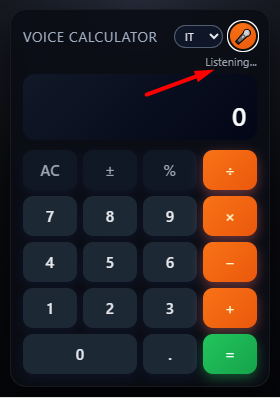
- The calculator window will appear with all the buttons and a microphone icon.
4. Choose language & click the mic
- Select your language (IT / EN / ES / FR) from the dropdown menu.
- Click on the 🎤 microphone icon in the popup.
- Wait until you see the message "Listening…"
5. Speak your operation
- Say a mathematical operation, for example:
seven times eightfive plus threefour hundred thousand times four hundred thousandsquare root of sixty-four
- The recognized text will appear under the title, and the result in the calculator display.
💻 How to Use the Windows Application
1. Download and launch the application
- Download
voicecalculator.exeusing the button above. - Run the file (Windows authorization may be required).
2. Select your language
- Choose your preferred language (IT / EN / ES / FR) from the dropdown menu.
3. Standard Mode: Click the microphone
- Click the 🎤 microphone button.
- Wait for the "Listening…" message.
- Speak your operation and the result will appear automatically.
4. "Always Listening" Mode (Windows Exclusive)
- Enable "Always Listening" mode from the menu or settings.
- The application will remain in continuous listening mode in the background.
- You can continue working on other applications and speak calculations at any time.
- The app will automatically recognize mathematical operations without clicking each time.
Supported Operations:
- Addition:
five plus three - Subtraction:
ten minus four - Multiplication:
seven times eight - Division:
twenty divided by five - Percentage:
twenty percent of one hundred - Square root:
square root of sixteen - Power:
two to the third
Voice Calculator © 2025 – Calculate with your voice, work faster